Seats and Roles
Each member of a Kumoy organization has a seat type, an organization role, and a role in each team. These three settings control different capabilities and should be considered separately.
Three Separate Settings#
What a member can actually do depends on the combination of these three settings.
| Setting | What it controls | Options |
|---|---|---|
| Organization role | Whether the member can manage the organization, billing, and members | Owner, Admin, Member |
| Seat type | The maximum editing access the member can be granted | Editor seat, Viewer seat |
| Team role | Whether the member can view or edit content in that team | Editor, Viewer |
Organization roles are assigned independently of editing access. A seat type sets the maximum editing access a member can receive, while team roles set their access in each team within that limit.
Organization Roles#
Organization roles control access to organization settings, members, and billing. A member's ability to edit maps and data depends on their seat type and team role, not their organization role.
| Organization role | What the member can do |
|---|---|
| Owner | In addition to Admin permissions, assign Owners, change the plan, and delete the organization |
| Admin | Invite and manage members, manage teams, and edit organization settings |
| Member | Join the organization and use the teams and projects assigned to them |
For example, an Admin with a Viewer seat can invite members and manage teams but cannot create or edit maps and data.
See Manage Organization Members for detailed permissions and instructions.
Seat Types#
Seat types are assigned at the organization level. They set the maximum editing access a member can receive in that organization.
| Seat type | Maximum editing access | Available team roles |
|---|---|---|
| Editor seat | When assigned the Editor role in a team, create and edit maps, projects, and data in QGIS and on the web | Editor, Viewer |
| Viewer seat | View web maps and other content shared with the team. Creation and editing access cannot be granted to this seat type. | Viewer only |
Viewer seats are assigned to accounts invited to the organization. People who view a public map or a keyphrase-protected map without signing in do not need a Viewer seat.
See Plan Limits for the number of seats included with each plan.
Team Roles#
Team roles determine whether a member can edit projects and data in a specific team. A member can have a different role in each team.
| Team role | What the member can do | Required seat type |
|---|---|---|
| Editor | Manage projects and edit data within the team | Editor seat |
| Viewer | View web maps and data shared within the team | Editor seat or Viewer seat |
A member with an Editor seat can still be assigned Viewer in a team where they only need read access. A member with a Viewer seat cannot be assigned the Editor team role.
See Manage Teams for instructions.
Seats and Roles at a Glance#
The following diagram uses an organization on the Corporate plan to show how seat types, organization roles, and team roles work together. The same relationship between seats and roles also applies to the Business plan.
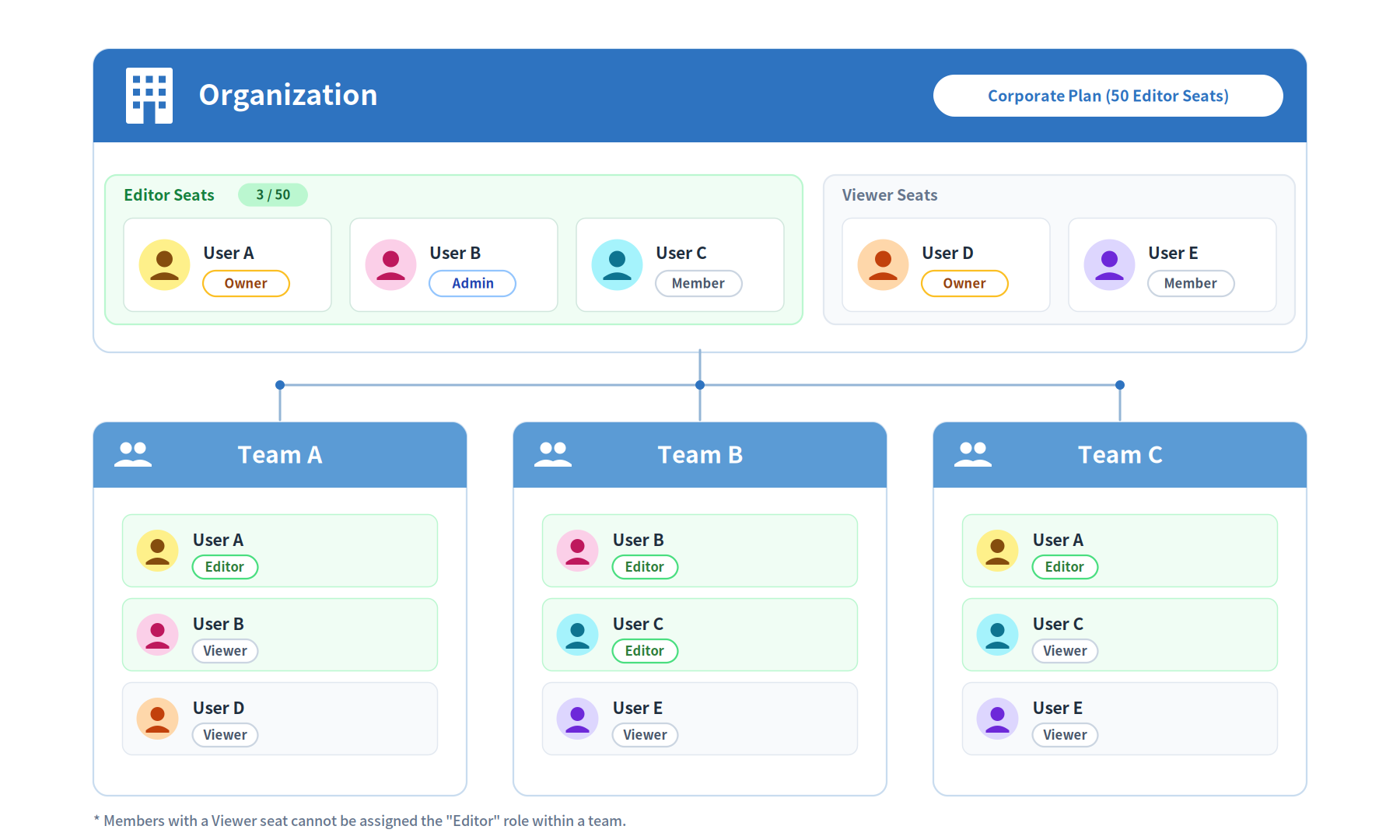
The diagram highlights the following points:
- Like User D, a member with a Viewer seat can be an organization Owner and manage the organization, but cannot edit maps or data.
- Like User B and User C, a member with an Editor seat can be assigned Editor or Viewer separately in each team.
Common Combinations#
This table shows common combinations and their effective access.
| Organization role | Seat type | Team role | Effective access |
|---|---|---|---|
| Owner or Admin | Editor seat | Editor | Manage the organization and edit maps and data in the team |
| Member | Editor seat | Editor | Edit maps and data in the team |
| Any | Editor seat | Viewer | View web maps in that team |
| Owner or Admin | Viewer seat | Viewer | Manage the organization, but only view web maps |
| Member | Viewer seat | Viewer | View web maps |
| Any | Viewer seat | Editor | This combination cannot be assigned |
For a complete list of what each role can and cannot do, see Permissions.
When a Seat Type Changes#
- Changing a member from a Viewer seat to an Editor seat requires an available Editor seat in the organization.
- When a member changes from an Editor seat to a Viewer seat, their Editor role in every team automatically changes to Viewer.
- Changing a seat type does not change the member's organization role as Owner, Admin, or Member.
See Cancel Subscription for changes caused by a plan downgrade.
Last update: Oct 7, 2026 23:52:25